The agent workbench for Unity

Build your game at the
speed of thought.

A git worktree per agent. Four players from one Play button. C# patched into the game while it runs, with no player build anywhere.

Not another assistant, not another MCP bridge. Those stop at the diff. This one runs the game and hands your agents the controls.

7-day free trial (no card required) macOS (Apple Silicon) · Windows (x64) Bring your own AI subscription No player builds
The Satura Space workbench: a file tree, an agent terminal staging a four-player match, four live Unity player views in a grid, the C# file being edited, and the Unity console, all in one window.

The whole Unity loop in one app, with the waiting taken out

Play the game inside the app Unity runs itself, hidden Method bodies land mid-play Agents work in parallel Four players, no builds Worktrees keep runs isolated
Why it's faster

Same agent. None of the waiting.

An agent is only as fast as the loop it runs in. Here is one code change, run through the loop everybody uses today, and then through this one.

The usual loopa coding agent, an MCP bridge, and you in the editor
  1. The agent writes the C# and asks Unity to compile it.
  2. You press Play and click your way back to the state where the bug showed up.
  3. Multiplayer? Build a player, or set up ParrelSync or Unity's MPPM package, then alt-tab between the windows either way.
  4. You type up what you saw and hand it back to the agent as prose.
A minute or two per change on a mid-size project, and every one of those minutes is yours.
Satura Spacethe same agent, on a bench built for it
  1. The agent patches the method body into a session that never stopped. Every spawned object and open connection survives.
  2. It runs C# against the live editor through Roslyn in memory: the snippet compiles in about a second, the editor keeps its domain, and this works during Play Mode too.
  3. It plays the game itself: input injected as a real keyboard and mouse, up to four synced players, a TddScenario that comes back pass or fail.
  4. It reads the console, a screenshot and the write trace without leaving its terminal.
  5. You watch the stream in the same window. Or you don't, and read the verdict.
About a second for a method-body change, and the checking that follows never needs you.

Method bodies hot-reload; new fields, methods and types still need a normal recompile. The rest of the fine print →

A project each

An agent can branch the whole project and test the game in it.

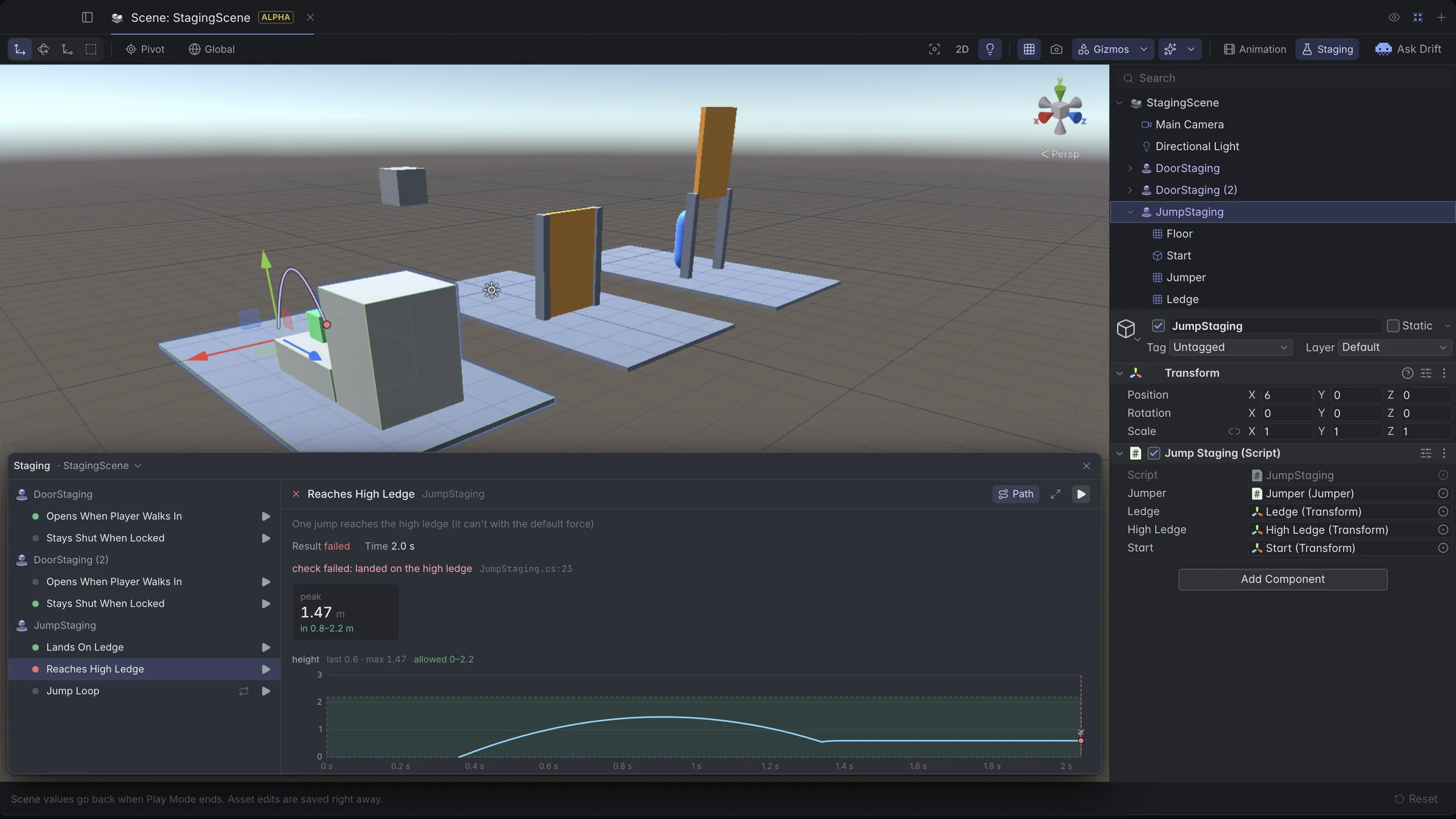
One call makes an isolated git worktree and boots a headless Unity editor inside it. The agent opens a scene there, enters Play Mode, patches C#, takes a screenshot, and never touches the checkout you are working in. When it is done, you merge a branch.

// one call: branch the project, boot an editor in it
unity_worktree_create(name: "shield-rework", launch: "headless-graphics")
  → .sspace/agent-worktrees/shield-rework on agent/shield-rework

// every other tool takes that path and works there
unity_open_scene(project_root: WT, scene_path: "Assets/Arena.unity",
                 enter_play_mode: true)
unity_exec_patch(project_root: WT, code: "...")
unity_screenshot(project_root: WT)

// back in your checkout, when it works
git merge agent/shield-rework

Instant

Seconds, not a re-importA full worktree carries your uncommitted changes over and seeds Library copy-on-write, so the editor boots with everything already imported.

Or a clean room

settings worktreesProjectSettings/ and Packages/ with an empty Assets/: a sandbox at your project's exact Unity version for work that starts from nothing.

Its own editor

Headless, per worktreeLaunched with a GPU device for screenshots, or -nographics for the cheapest possible run. Idle editors quit themselves after about ten minutes.

Out of your way

Hidden under .sspace/Not in the file tree, not in search, not in the parent checkout's git status. unity_worktree_list shows them and their editors; unity_worktree_remove clears them.

You can also start a session in a fresh worktree from the launch screen, so two agents you supervise never share a checkout. How agent worktrees work →

Multiplayer

Agents test multiplayer end to end.

Netcode bugs only show up with real clients. An agent drives a four-player match inside the app, host and clients at once: it plays the scenario, finds the bug, fixes it and re-runs. You never build a player.

Live patching & C# hot-reload

Agents patch the live game.

An agent shouldn't have to stop your session to change it. Through the MCP exec bridge it patches the running scene (below: 180 cubes spawned into a live game), and edited C# hot-reloads into the same session without a rebuild or restart. That covers Assembly-CSharp, asmdefs and embedded packages; new fields or methods still take a normal recompile.

A real workbench

Everything you need around the game.

One window: Unity modes, extra clones, agent terminals, alerts, editor, search, logs, resource stats. Terminals live in a detached daemon, so quitting or updating the app doesn't kill an agent mid-thought.

The real editor, on demand

Real editor, one click away.

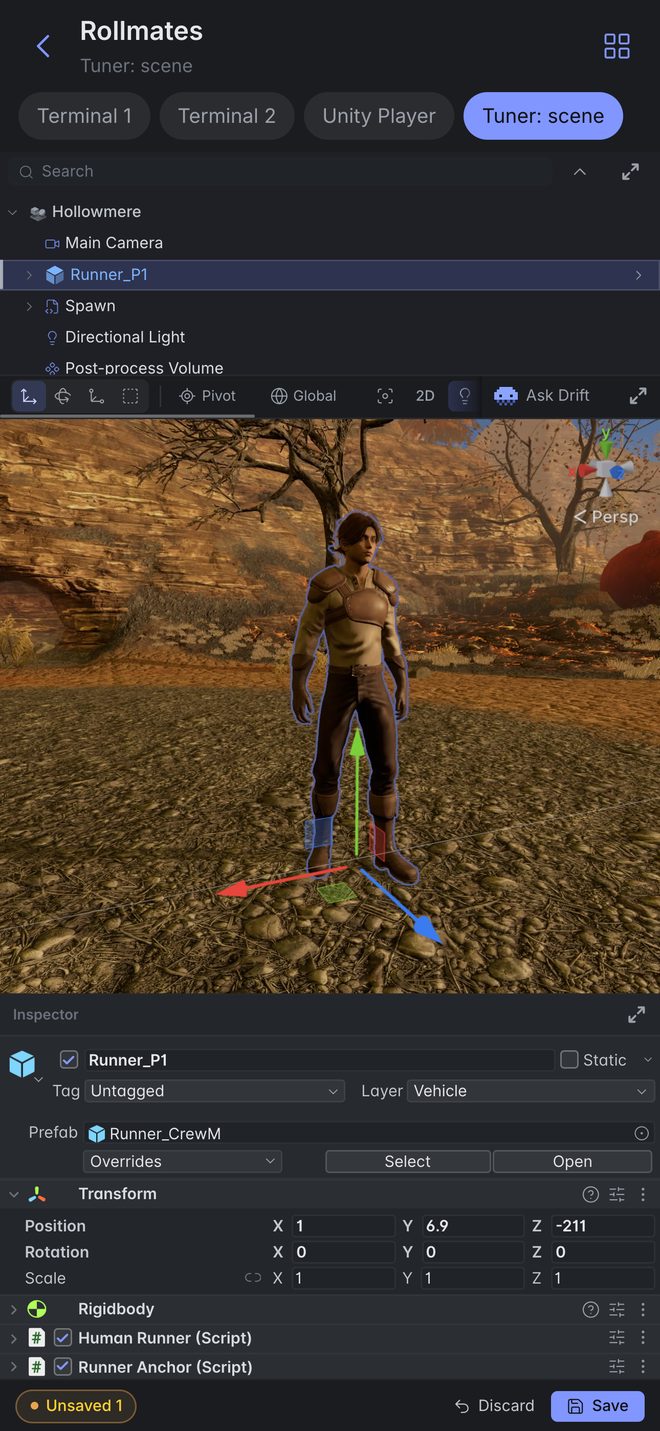
Unity runs out of sight while you watch the stream. One click shows the real editor window, the same running instance with no relaunch, for a pass through the Hierarchy and Inspector. One more click hides it.

Headless Unity

Don't render what nobody's watching.

Tests and long grinds don't need pixels. Normal hides the editor and streams at full fidelity, Headless Graphics drops the window but keeps the view, Headless NoGraphics drops rendering entirely; Update() then ticks past 5,000 times a second.

Coding agents, in parallel

Stop waiting on one agent at a time.

Every agent gets its own live terminal, tiled across panes, tabs and windows. Claude Code comes wired to Unity via MCP: it opens scenes, runs the game and reads the console on its own.

Claude Code Codex Cursor Grok Build Kimi opencode

Detected from your PATH. Bring the subscription you already pay for.

Alerts Has sound

Hear the moment an agent stops.

Kick off a long run and walk away. A finished turn flashes green and plays a sound, a permission stop flashes amber, even from a tab you aren't looking at. Nine sounds ship with it, including the Half-Life HEV beeps.

Many instances at once

Add a client without making a build.

Up to four lightweight clones in an auto-grid: one Play button, each with its own stream, console and hot-reload. It's the same grid an agent uses to test a match, except you hold the mouse.

Explorer & editor

Read and fix code where the game runs.

A .gitignore-aware file tree, a real editor with git blame, full-text search with replace, fuzzy quick-open, in as many panes as you need.

Usage & limits

See a spent plan coming.

Claude and Codex session and weekly limits, with reset times, straight from the status bar.

Unity logs

Debug without switching to Unity.

The Unity console streams into the app: counts, per-player filtering, every Debug.Log line, all searchable.

Resource stats

Know what's eating your machine.

Live CPU and memory for every terminal, Unity instance and internal process.

unity_editor_status unity_screenshot unity_open_scene unity_trace_writes unity_stop_play unity_trace_report unity_refresh unity_add_player unity_relaunch unity_remove_player unity_shutdown unity_arm_hot_reload unity_resolve_dialog unity_set_stream_fps unity_set_stream_res unity_exec_query unity_source_find unity_exec_patch unity_source_grep unity_logs unity_source_read unity_tdd_logs unity_docs unity_worktree_create unity_worktree_list unity_worktree_remove unity_start_editor
Unity MCP

Your agent can drive Unity itself.

It registers itself in the project. 27 tools open scenes, run Play, patch the live game, read the console, add clients and branch the project into a separate worktree per agent. It can also grep Unity's own C# source, so it works from how the engine behaves rather than from what it remembers.

public class HostJoinTest : TddScenario
{
    public override IEnumerator Run()
    {
        if (IsHost) yield return StartHost();
        else        yield return JoinAndMove();
    }
}
Scenarios

Agents prove the change works.

Subclass TddScenario, write Run(). Any player executes it (headless or live, host or client) and reports pass or fail; every clone gets its own PlayerIndex and IsHost.

Themes

Five themes. Pick the room you're working in.

Dark, Light, Midnight, Nebula and Sepia recolor the app chrome instantly; terminals, editor and game view keep their own rendering.

One screen to launch

Pick a folder. Press Launch.

It covers the folder, the terminals, the agents (down to model and reasoning effort), the Unity mode, and an optional fresh git worktree. On macOS the Library clones instantly with no extra disk, and an agent can branch itself another worktree later.

How it compares

Six ways to hand an agent Unity. One that hands it the game.

Unity's own two, and the four most-starred community bridges, checked against their repositories and pricing pages this week. Most of them are good at what they do. None of them show you the game running.

Satura Space
mcp-unity Gamester
Unity AI Unity
Unity CLI Unity
MCP for Unity Coplay
Unity-MCP Murzak
Unity MCP AnkleBreaker
ToolWhat it isToolsPriceWhat it's best at
Satura Spacedesktop app · macOS, Windows A bench that runs Unity for you and streams the game your agents are building 27 + exec $19/mo · bring your own agent Watching the change run, and having the agent prove it without you
Unity AIUnity · official · open beta Ask, Plan and Agent modes inside the editor, plus an MCP server and a gateway for your own keys Credits · $10 per 1,000 Zero setup on Unity 6.2+, because it comes with the engine
Unity CLIUnity · official · beta A standalone unity binary; the experimental Pipeline package attaches it to a running editor Free Evaluating C#, builds and tests from a shell or from CI
MCP for UnityCoplay · Python · 13k★ The default bridge: editor tools over MCP for whichever client you use 47 Free · MIT The widest Unity support in the field, 2021.3 LTS through 6.x
Unity-MCPIvan Murzak · C# · 3.7k★ Tools plus reflection, so it can call any C# method, including private ones and ones inside DLLs 70+ Free · Apache-2.0 Reaching methods nobody wrote a tool for, and adding your own in one line
mcp-unityCoderGamester · TypeScript · 1.9k★ A Node bridge that can fire any MenuItem in the editor 24+ Free · MIT Menu-driven workflows, and wiring itself into VS Code-like IDEs
Unity MCPAnkleBreaker · Node · 352★ The largest catalog, with 254 of its tools behind a lazy discovery proxy 330+ Free · own license Editor surface nobody else wraps: Shader Graph, terrain, NavMesh, ProBuilder, profiler, MPPM
27 tools, not 330 · a tool count is a menu, not a capability
One call instead of twelveA narrow tool does one thing per round trip. unity_exec_patch takes a C# body, so placing twelve objects, wiring their references, checking the result and printing back only what the agent asked for is a single call.
It compiles into the live editorRoslyn, in memory, about a second, with no domain reload. It runs during Play Mode too, and static state survives between calls, so an agent can query, change and re-check inside one session.
It reaches APIs we have never heard ofA fixed tool does what its author foresaw. Exec reaches every Editor API and every package in your project: Shader Graph, terrain, NavMesh, ProBuilder, your own editor extensions, and whatever you install tomorrow.
Every tool costs context on every turnSchemas ride along with each request. The biggest catalog in the table hides 254 of its 330 tools behind a discovery proxy for exactly this reason; its own notes put a lookup at 10 to 22 KB before that rework.
The 27 do what exec cannotC# inside the editor cannot launch a second editor, branch a git worktree, clear a native modal that is blocking its own main thread, read Unity's source, or outlive a domain reload. That is what the named tools are for.
The fair counterpoint: named tools help an agent that does not know Unity's API. Ours gets unity_source_grep and unity_docs instead: the real signatures for your exact editor version, rather than a longer menu.
Only in Satura Space · nothing else in the table ships these
Play-Mode hot-reloadmethod bodies patched into the running session, state intact, nothing to annotate. Unity's experimental Pipeline package asks you to mark each method by hand
The game, in the appthe running game streamed into the window, with mouse and keyboard injected as real devices; the rest of the table can take a screenshot
4-player clone testingthe agent boots synced clones and plays the match through them. MPPM tooling elsewhere launches clones, it does not play them
unity_trace_writesdata breakpoints: what writes this field at runtime, and on which frame
unity_resolve_dialogclears a native modal that has frozen the editor, which C# inside Unity cannot do: its main thread is the one being blocked
unity_source_grepgreps Unity's own C# source at your editor version, not the docs about it
unity_worktree_createbranches the project per agent, each worktree with its own headless editor
TddScenariopass/fail scenarios the agent runs in-engine to prove the change
Facts checked against public repositories and pricing pages · 29 July 2026

Assistants get cheaper and smarter every quarter, and every one of them works better on this bench. Swap your agent whenever you like; you keep the same bench.

What it needs

Runs on the setup you already have.

It drives the Unity editor and the agent CLIs already on your box. Nothing runs in the cloud.

Platform

macOS · WindowsApple Silicon and Windows x64. Auto-updating desktop app.

Unity

Unity 6Opened at your project's exact editor version, through Unity Hub.

Agents

Six, out of the boxWhichever of them are on your PATH. Every terminal is a real shell.

Your AI plan

Bring your ownSatura Space never resells tokens and never asks for your API key.

The fine print, upfront.

The limits you'd otherwise discover after paying.

Works today Not yet
Unity 6 (Mono scripting backend) Unity 2022/2021 LTS
New Input System, injected as real devices Legacy Input Manager input injection
Hot-reload of method bodies: Assembly-CSharp, asmdefs, embedded packages Hot-reload of new fields, methods, types (normal recompile)
macOS Apple Silicon · Windows x64 Intel Macs, Linux
Claude Code, Codex and Cursor with auto-registered Unity MCP

If your setup is in the left column, you're 60 seconds from playing. If something in the right column is blocking you, say so on Discord; those votes rank our roadmap.

Pricing

One plan. Every feature.

Bring your own AI subscription; Satura Space never resells tokens.

Satura Space PRO
$19/ month

$15/mo on the annual plan.

No credits, no overage, no token markup. Agents bill through the subscription you already have; we charge for the bench.

  • Verify agent work in seconds. The game is already running beside the terminal; grab the mouse and play
  • Open the Unity Editor less. It runs hidden, with headless modes for tests and long grinds
  • Change C# without restarting the game. Method bodies hot-reload during Play Mode
  • Ship work in parallel. A team of agent terminals, Claude Code pre-wired to Unity via MCP
  • Test multiplayer without builds. Up to four lightweight clones of your game in one grid
  • Less alt-tabbing. Editor, terminals, search, Unity logs and resource stats in one window

Bring your own AI subscription; no token resale, no API keys. macOS (Apple Silicon) and Windows (x64), auto-updating.

Choose your plan
$15/mo
$180 billed yearly · renews automatically · cancel anytime
Pay with
CardVisa · Mastercard · more
Get Started for Free

Start with a free trial, no card required. Cancel anytime; card checkout only when you subscribe.

Straight answers

The things you'd want to know first.

Does it change my Unity project?

A little, nothing hidden: one line in Packages/manifest.json, the engine package in Packages/, a .sspace/ working folder, and MCP registration for the agents you use (.mcp.json, .claude/settings.local.json, .cursor/mcp.json). Everything but the manifest line is gitignored for you.

Do I have to open the Unity Editor?

No. It launches the editor hidden and streams the game into a panel. When you do want it, Reveal Editor pops the real window out instantly.

How does Reveal Editor work?

The hidden instance is a full Unity editor whose windows are suppressed at the OS level; Reveal shows them. Same process, so it's instant, with no relaunch or domain reload, and Play Mode keeps streaming while you tweak the Inspector. Hide it again and nothing restarts.

What exactly can hot-reload change?

Method bodies, during Play Mode, on Unity 6 (Mono), in any of your scripts: Assembly-CSharp, asmdefs and embedded packages. New fields, methods or types need a normal recompile; a patched Awake or Start only affects objects spawned after it.

How is this different from a Unity MCP server?

An MCP server hands your agent the editor; every one of them stops when the code compiles. Satura Space is the app around that: Unity runs hidden, the game streams into the window, C# lands in the running session without a domain reload, and the agent plays the result through injected input before it reports back. Its own Unity MCP server is one part of the product, not the product.

Why does it ship 27 tools when other Unity MCP servers ship hundreds?

Because the widest tool is a compiler. unity_exec_patch takes a C# body and runs it through Roslyn in the live editor, with no recompile, no domain reload and no need to leave Play Mode, so one call can place twelve objects, wire them and print back only what the agent asked for. That reaches every Editor API and every package in your project, including ones written after we shipped. The named tools cover what C# inside the editor cannot do: launch editors, branch worktrees, clear native modals, grep Unity's own source. Tool schemas also cost context on every turn, which is why the largest catalog in this space hides 254 of its 330 tools behind a discovery proxy.

Which Unity versions are tested?

Unity 6 across all three release streams: 6000.5.4f1, 6000.3.6f1 and 6000.1.17f1. Other Unity 6 patch releases generally work too; these are the ones we verify against.

Which coding agents work?

Claude Code, Codex, Cursor, Grok Build, Kimi and opencode, whichever are on your PATH. The first three get the Unity MCP server registered automatically; every terminal is a real shell, so anything else works too.

Do I need an API key?

No. Bring the CLI agents you already pay for; Satura Space never proxies prompts, resells tokens or asks for a key.

Does my game or code leave my machine?

No. Frames move over a shared GPU texture and everything else rides local loopback. Crash reports are anonymous and scrubbed of project detail.

Will my game receive the mouse and keyboard?

Yes, if it reads Unity's Input System: input arrives as a real keyboard and mouse device. Legacy Input Manager games won't see it.

Can I run more than one copy of the game?

Yes, two ways: up to four lightweight multiplayer clones of one session, each with its own stream, logs and hot-reload, plus git worktrees for as many independent sessions as your machine handles. Headless NoGraphics is single-player only.

Can two agents work on the project without overwriting each other?

Yes. Launch each session in its own git worktree from the start screen, or let an agent make its own: the Unity MCP tool unity_worktree_create branches the project into .sspace/agent-worktrees/<name> on branch agent/<name> and boots a headless editor there. Merge the work back with git merge agent/<name>.

How do the multiplayer instances work?

Each clone is a real hidden editor pointed at a stub project that links back to your Assets and Packages and reads the main Library (the same trick as Unity's Multiplayer Play Mode), so it boots in seconds with no re-import. One Play button starts the grid; every clone gets its own stream, console, input and hot-reload, so your netcode sees separate players.