Working with Unity
Staging prefabs
How agents test one mechanic on a small set of its own, and how you run and read those scenarios from the Tuner.
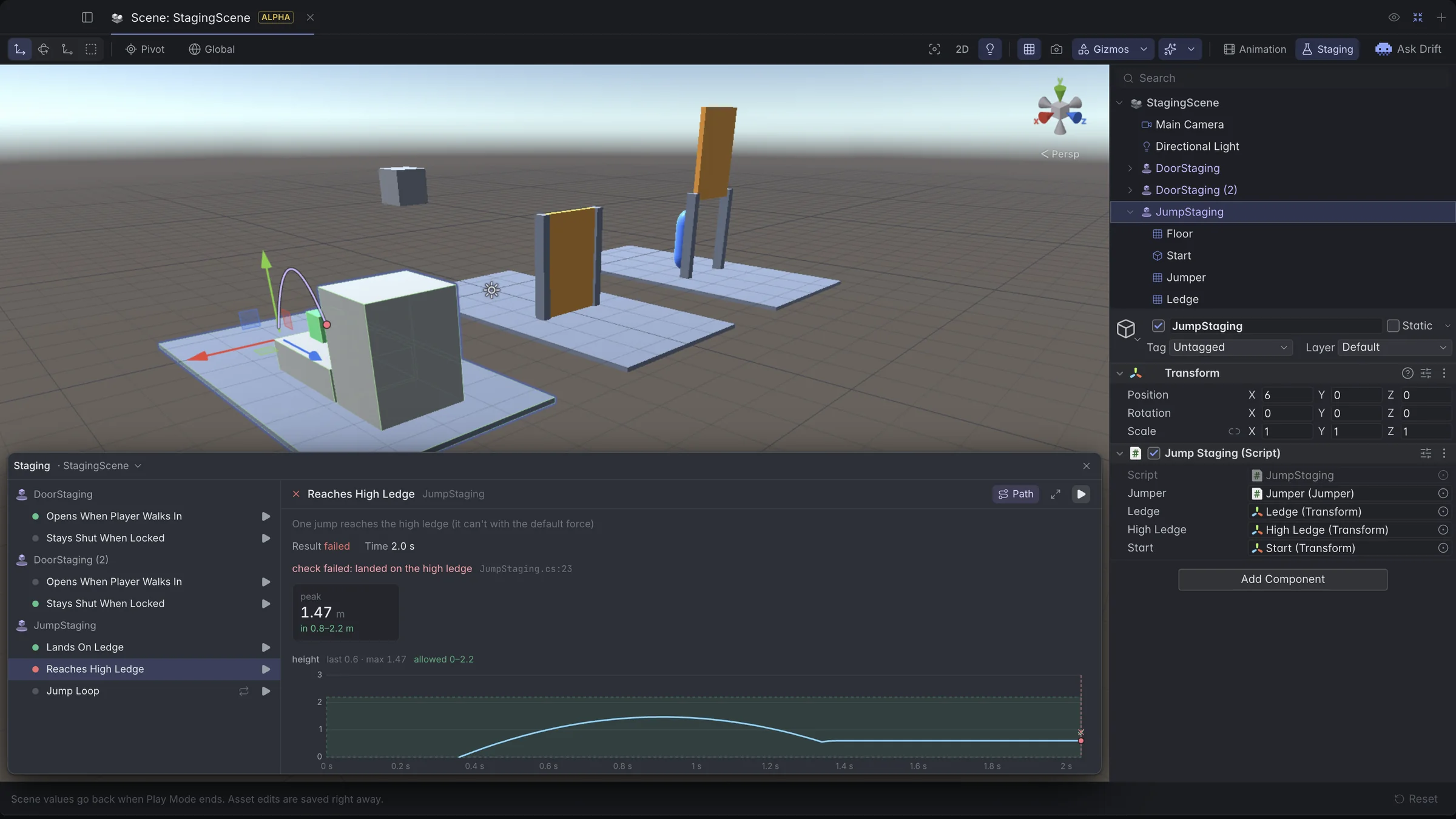
A staging prefab sets up a small situation to check how one prefab behaves in it: a nested instance of the prefab under test, the floor, walls, enemies or props it needs, and a script that derives from SaturaStaging. The agent writes the scenarios in C#. You press ▶ in the Tuner to run them. When one fails, you see which check broke and on what line, with a chart of the run and the path it took.
Staging scenes
A staging scene holds several staging prefabs side by side. It's a debug scene: leave it out of Build Settings. A project can have several staging scenes, and only the open one's staging prefabs are loaded.
Scenarios
A scenario is a coroutine on the staging script, marked [SaturaScenario]. It passes when it ends. A failed Check(condition, what) or an exception fails it, and passed checks are logged.
public class DoorStaging : SaturaStaging
{
    public Door door;
    public Walker player;

    [SaturaScenario("The player walks up and the door opens")]
    IEnumerator OpensWhenPlayerWalksIn()
    {
        player.Move(Vector3.forward);
        yield return new WaitForSeconds(2);
        Check(door.IsOpen, "door open");
    }

    [SaturaScenario("Jumps again and again", Loop = true)]
    IEnumerator JumpLoop() { ... }

    [SaturaHandle("Unlocks the door")]
    void Unlock() => door.locked = false;
}- Scenarios run in Play Mode with the real game code, only in the staging scene. Running one from Edit Mode enters Play first.
- Several staging prefabs can run at once, and each one is separate. A staging prefab runs one scenario at a time.
- Running a scenario again on the same staging prefab replaces it with a fresh copy, the state it had when Play started, so every run starts clean.
Loop = trueruns the scenario again after each pass, on the same instance, and resets nothing in between. Your Inspector changes carry into the next pass. A failed pass is logged and the loop goes on until it's stopped.[SaturaHandle]methods on the staging script become handles grouped by the instance's name, likeDoorStaging (2)/Unlock. See Handles and reports.
What a run records
A scenario can record what happened, for the panel's report and for the agent:
| Call | Records |
|---|---|
Plot(name, value, min, max) | One chart point per call, with an optional band. The band is only drawn; samples past it are counted and the run still passes. |
Metric(name, value, unit, min, max) | A number. A range also makes it a check. The previous run's value is kept next to it. |
Track(obj) | The object's world path until the run ends, drawn in the Tuner scene view. |
Step(name) | A phase that lasts until the next step. |
Snapshot(name) | A small 480×270 JPEG of the staging prefab, under .sspace/staging/snapshots. |
Check(condition, what) | A pass or a fail at that moment. |
[SaturaScenario("One jump lands on the low ledge")]
IEnumerator LandsOnLedge()
{
    Step("place");
    Track(jumper);
    Place();
    yield return new WaitForSeconds(0.3f);
    Step("jump");
    jumper.Jump();
    for (float t = 0; t < 2; t += Time.deltaTime)
    {
        Plot("height", jumper.transform.position.y, 0, 2.2f);
        yield return null;
    }
    Snapshot("landed");
    Metric("peak", peak, "m", 0.8f, 2.2f);
    Check(OnTop(ledge), "landed on the ledge");
}
Times count from the start of the run, or of the pass for a loop. Limits per run: 8 plots of 240 points per pass (longer runs are downsampled), 4 tracked objects, 16 metrics, 24 steps and 64 checks per pass, the last 5 passes of a loop, and the last 12 snapshots.
Running from the Tuner
Open the Staging panel with the Staging button next to Animation in the Tuner. Each scenario has ▶ to run it and ✓ or ✗ for its last run. The panel shows the selected scenario's report and draws its tracked path in the scene view. Its header switches between staging scenes.
Your runs record no video and leave your camera alone. A video link shows only for runs an agent started.
Agent runs
An agent runs a scenario with handles.call. A failed scenario returns its result instead of throwing, along with the report as numbers: metrics, series, steps, checks, snapshots and tracks. Every run an agent starts records a video that frames its staging prefab, ready for a report.
const r = await handles.call('DoorStaging (2)/OpensWhenPlayerWalksIn')
const loop = await handles.call('JumpStaging/JumpLoop')
await handles.result(loop.run)
await handles.stop(loop.run)
To run a scenario from another staging scene, the agent opens that scene first.